
• Skip to primary navigation
  • Skip to main content
  • Skip to primary sidebar
  • Skip to footer

Techinline Blog

Remote Support Software Explained

SetMe
Remote Support Software That Always Works
Free trial
Techinline Blog
  • Product
  • Features
  • Pricing
  • How It Works

Techinline’s Major 3.0 Version Release: Unattended Access is Now Available!

August 5, 2013 by Serge Soroka

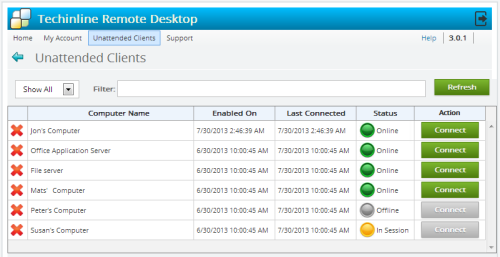
Techinline is thrilled to announce the release of the long-awaited, highly anticipated Unattended Access feature! This feature delivers increased flexibility and convenience to work on and resolve clients’ computer problems without their intervention or presence. Furthermore, it will allow Techinline users to utilize our application in a number of new ways, such as to provide remote maintenance or after-hours support. We sincerely hope that this feature will deliver add-on value to our clients, especially considering that it does not involve any extra fees or upgrade costs!

Important Note: Unattended access is only available for subscription licenses. The Per-Session licenses will not offer this feature. Techinline’s pricing is summarized on our Buy Now page.

The process of configuring and managing unattended computers is explained in the Unattended Support Connection section of our online documentation.

Although unattended access is by far the main centerpiece of Techinline’s major 3.0 release, this new version also contains several other improvements that are also worth mentioning:

  • Ctrl+Alt+Home for Disabling Mouse Cursor Movement – You are now able to press Ctrl+Alt+Home to release your mouse input from the remote computer. In other words, your mouse movement is not sent to the remote computer. To regain control of the remote mouse, simply click on the remote desktop
  • Optimized Compression Algorithm – We’ve optimized our compression algorithm to better support full-color images on the remote computer
  • Windows Background – Due to an enhanced compression algorithm, the Windows background on the remote computer is no longer blacked out during the session. You will now be displayed the end-user’s actual background
  • Improved Layout of Session Usage Report – We’ve made some changes to the layout of the Session Usage Report to provide a more user-friendly and intuitive experience of working with this key feature
  • Revitalized & Stylish User Interface Design and Appearance – We’ve made some changes to the user interface to deliver a fresh and modern look


Techinline’s development team is actively working on further expanding our application’s functionality and feature-set, and as a result, Techinline users should expect to be treated to several other major enhancements in the coming months. We kindly ask all Techinline users to contact us with any feedback, questions, or concerns regarding the most recent update or share their ideas about any other key features that they would like to see.


Register now for a fully featured 15-day free trial of Techinline
Filed Under: Updates Tagged With: Features, Unattended access, Version update

Tips & Tricks: Using Techinline’s Yellow Information Panel to Restart as a System Service

January 21, 2013 by Serge Soroka

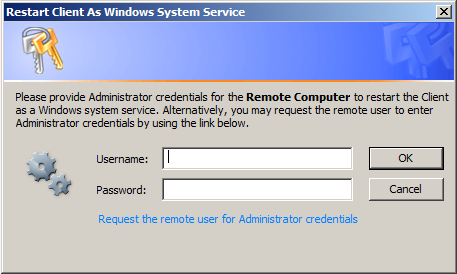
We’ve received several recent cases with Techinline users questioning why they’re unable to control certain applications on the Client’s computer or view UAC (User Account Control) dialog prompts that appear on the remote computer during the session. Apparently this behavior seems to cause some confusion and may appear to some as a product limitation that cannot be lifted. We would like to take the time to further describe situations that may result in the limitations mentioned above, as well as explain Techinline’s Restart as a Service feature which may be used to obtain elevated privileges during the remote session. [Read more…] about Tips & Tricks: Using Techinline’s Yellow Information Panel to Restart as a System Service

Filed Under: Tips & Tricks Tagged With: Product interface, Windows System Service, Windows UAC

Use Techinline’s Desktop App to Bypass Plug-in Installation

August 23, 2012 by Serge Soroka

The feedback that we periodically receive suggests that Clients often find it cumbersome and confusing to follow instructions for installing a browser plug-in to start a Techinline session. In such situations, we recommend using Techinline’s Client Desktop Application as an easy way to bypass the plug-in installation and obtain a Client ID.

Clearly, if one is in the business of providing tech support, chances are that they often don’t have the most computer-advanced user at the other end, and even straightforward instructions such as clicking on a yellow bar or a large “Install” button at the bottom of the browser page may prove to be a nightmare or nearly unbearable task. [Read more…] about Use Techinline’s Desktop App to Bypass Plug-in Installation

Filed Under: Updates Tagged With: Desktop application, Plugins

How Chrome’s Recent Extensions Policy Change Affects Techinline Users

August 2, 2012 by Serge Soroka

Update on August 7th: Techinline’s plug-ins have been approved by Google and added to the Chrome Web Store. As a result, the problem described in the blog post below is now resolved.

We would like to inform all Techinline users that yesterday, August 1st, Google publicly released its latest version (21) of the Google Chrome browser. This update was initially planned for the middle of August, but as it turns out Version 21 was released roughly 2 weeks ahead of schedule. Chrome’s latest version contains a major policy change concerning plug-in installations. Specifically, starting with Version 21 all browser plug-ins must now be loaded from the Chrome Web Store. [Read more…] about How Chrome’s Recent Extensions Policy Change Affects Techinline Users

Filed Under: Product Tagged With: Desktop application, Google, IT developments, Plugins

Ctrl-Alt-Delete Feature Added in Techinline’s 2.5.1 Release

July 24, 2012 by Serge Soroka

Press Ctrl-Alt-Delete to log on

More good news from Techinline’s “Development Front” – we have released yet another upgrade over the past weekend which includes the ability to send a Ctrl-Alt-Del command. This feature is available on all Operating Systems supported by Techinline and can be executed in the following two ways: [Read more…] about Ctrl-Alt-Delete Feature Added in Techinline’s 2.5.1 Release

Filed Under: Updates Tagged With: Bug fixing, Features, Version update

Safe-Mode Reboot Now Available in Techinline’s Latest 2.5.0 Major Upgrade

June 9, 2012 by Serge Soroka

Request Windows Password Menu

We’re thrilled to announce the release of yet another major Techinline upgrade, 2.5.0, which will be launched tomorrow. The latest version is packed with a number of useful features including a Safe Mode Reboot and Switch User functionality.

What to look for in the latest release:

Reboot Client Into Safe Mode: You are now able to reboot the remote computer into Safe Mode while maintaining an active Techinline session. The remote Client will be automatically reconnected to the support session after the safe mode reboot  is completed. [Read more…] about Safe-Mode Reboot Now Available in Techinline’s Latest 2.5.0 Major Upgrade

Filed Under: Updates Tagged With: Auto-Reboot, Branding, Features, Version update

  • « Go to Previous Page
  • Page 1
  • Interim pages omitted …
  • Page 34
  • Page 35
  • Page 36
  • Page 37
  • Page 38
  • Go to Next Page »

Primary Sidebar

Most Popular

Meet SetMe Solo: Ideal Pricing Plan for Individual & Small Businesses

New SetMe Features: In-Session Unattended Setup, Screen Blanking for Mac & More

SetMe's Unattended Access Is Here

New SetMe Feature: Disable Remote Input

Chrome Remote Desktop Review: The Pros & Cons

Best Remote Desktop Software for Mac in 2024

Follow Us

Recent Posts

  • Multi-Factor Authentication (MFA) in Remote Access Software October 16, 2025
  • How to Disable Automatic Updates on Windows 11 (Step-by-Step 2025 Guide) September 26, 2025
  • 5 Things to Know About Remote Desktop Software in 2025 September 17, 2025
  • Unattended Access: Use Cases & Benefits September 15, 2025
  • How to Remove Built-In Windows 11 Apps September 2, 2025
  • Fix Unmountable Boot Volume Error in Windows 10 & 11 (2025 Guide) August 26, 2025

Footer

Product

  • Features
  • Pricing
  • How It Works
  • Security

Resources

  • Product Roadmap
  • Help Center

Try It Free

Do you enjoy reading our posts? You might also like our remote support app. Give it a try, it's free for 15 days:

Try SetMe Free

© 2026 · Techinline Ltd. · Built on the Genesis Framework