
As a business grows, so does its IT infrastructure. According to the Allianz 2025 Risk Barometer, cyber incidents still rank as the number one business risk globally, which dictates the need to support the ever-growing number of users and devices in a more reliable, scalable manner.
There are numerous reasons why cyber incidents occur: low security awareness among end-users, poor IT maintenance, and insufficient software investments, to name a few. While ensuring good password hygiene seems trivial, choosing the right unattended access software solution that fully meets your needs for maintenance and security is a whole different story.

Whether you are a business owner, IT administrator, or support technician, in this article you will learn how unattended access can help you maintain the highest level of security within your organization and which solution might be the best fit for your needs.
What is unattended access?
Unattended access is a vital remote desktop feature that allows you to connect to a remote device at any time and control it without the end-user’s involvement. In contrast to attended technical assistance which requires the user’s presence during a support session, unattended access is used for regular connections to a remote machine or group of machines when no one is there at the remote end.
No matter the size of your organization, this functionality brings a ton of benefits to admins and technicians who need to provide after-hours support, set up and distribute company-owned devices, perform routine maintenance and computer health checks in order to ensure infrastructure security – all that without disturbing the end-user and disrupting their productivity.
Top use cases of unattended access
Given that there is no need for the end-user to initiate a remote connection, technicians can deliver 24/7 unattended support, install patches or critical updates, and perform any other security or maintenance tasks whenever the time is right.
Here’s what else you can do with unattended remote access as an IT professional:
- Carry out routine maintenance at scale and mass install updates or software across computers on a large network.
- Keep track of the remote computer’s configuration and monitor system health.
- Perform power actions, such as reboot or shutdown, and automatically reconnect to a remote machine.
- Securely support devices located in public areas, including digital screens and billboards.
- Establish a secure connection to your office computer and work from anywhere in the world.
- Retrieve important data from your own devices while on the go.
- Transfer files, folders, and copy-paste data from/to the unattended device.
Benefits of unattended remote access
Being able to securely access a remote device and provide technical assistance at any time eliminates the need for offline IT support and provides you with additional benefits, such as:
- Increased security and improved regulatory compliance
- Significant cost reduction
- Streamlined workflow processes
- Faster issue resolution
- Enhanced productivity
- Meeting WFH requirements
Easy & reliable solution for unattended remote access
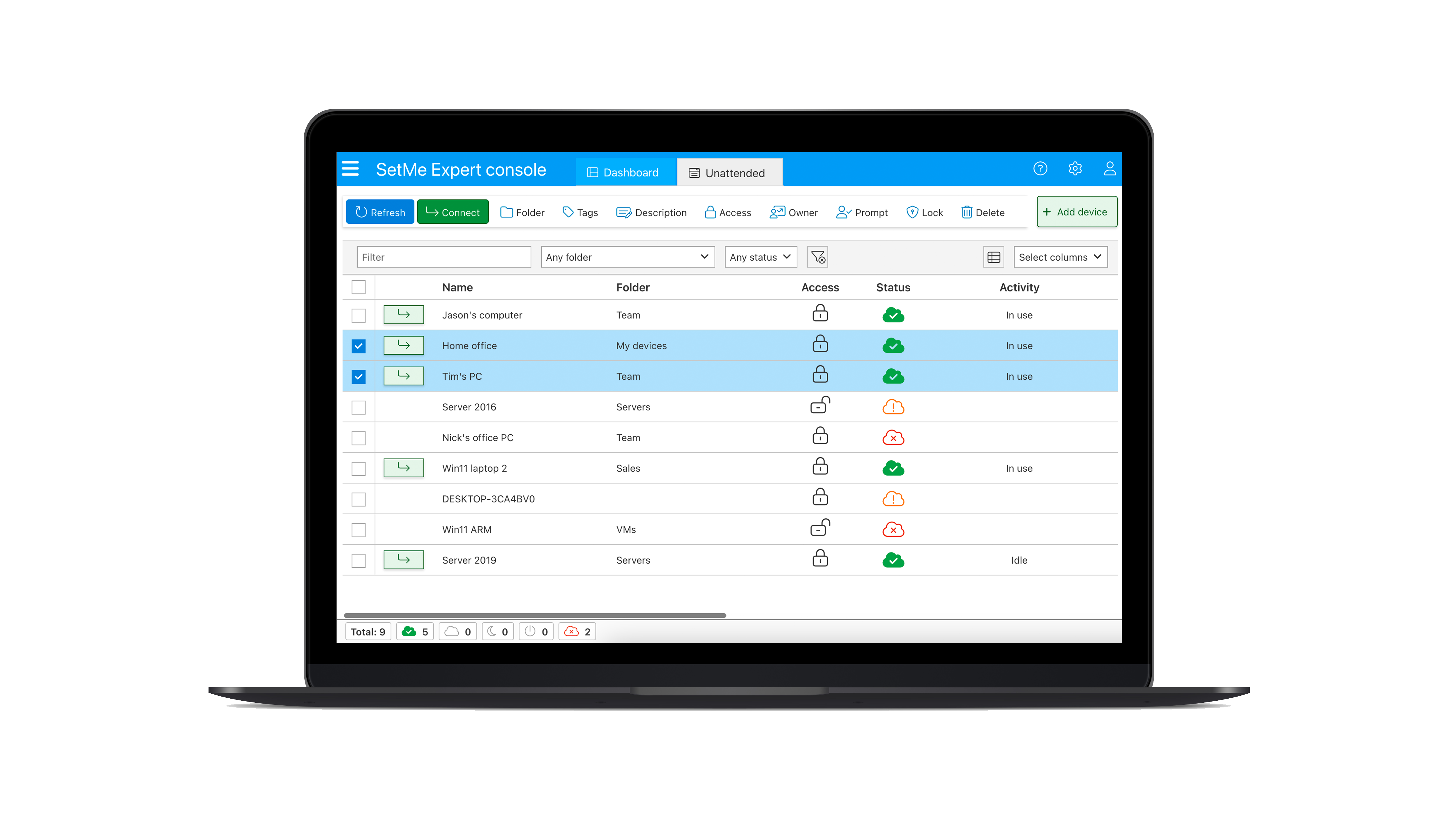
When managing remote systems, you need confidence, not just access. With the right unattended access solution, you and your team can work securely and efficiently from anywhere while staying fully compliant with company policy. Multi-factor authentication and end-to-end encryption keep your data protected, while detailed activity reports give you visibility and control over every connection.
With Techinline’s SetMe, you get the reliability and security that make remote access seamless and stress-free, all backed by bank-grade protection architecture and effortless scalability.
Access to an unlimited number of remote computers
With one SetMe license, you can set up unattended access to as many remote computers as you need. No limits, no extra costs: you get the freedom to scale your operations without worrying about access restrictions. All devices can be managed from an intuitive desktop app or web portal accessible anytime, anywhere.
Always-on remote access
To eliminate unwanted interruptions during your work, you can prevent the end-user from unintentionally removing the unattended application without your knowledge or consent. This feature is essential in any environment where users are restricted from uninstalling software on their own.
Consent preferences
You’re in control of how and when you connect. With customizable consent prompts, you can notify users before connecting, thereby avoiding disruptions when they’re focused on important work.
Enhanced privacy when it matters
When working with remote devices located in public areas, you can black out the remote screen so that no one can see what you’re doing on the remote desktop. This way you can temporarily hide the contents of your unattended session and protect any sensitive data from interception or unauthorized viewing.
Automatic sign-in with saved credentials
To bypass the login screen after a reboot and continue your work without knowing the username and password, SetMe offers the option to automatically sign in with saved credentials which are securely stored on the remote machine.
Always up to date
Unlike many other similar solutions, SetMe ensures that all its applications are automatically updated to the most recent version so you can access your unattended devices at all times, without any issues or delays.
Sign up for a free 15-day trial and start exploring SetMe today: