

We often receive feedback from prospects wondering why FixMe.IT has no perpetual license plan. Let’s be clear on this: perpetual or so-called “lifetime” license is a good marketing hook that attracts lots of new customers, but in the end leaves you paying more than you should. Subscription, in turn, is a more flexible and honest licensing model, which allows you to be in full control of your company’s budget. [Read more…] about Lifetime License vs. Subscription: Which One Is Better?
3 Main Reasons Why FixMe.IT Isn’t Free
We’re often asked by prospects if there’s a version of the FixMe.IT remote support application that’s free for personal or limited business use. The answer is always the same: there isn’t and there will never be. And here’s why we’ve never had plans to make a free version of our product. [Read more…] about 3 Main Reasons Why FixMe.IT Isn’t Free
New Windows 10 Feature Allows Block On Win32 Apps, FixMe.IT Not Affected
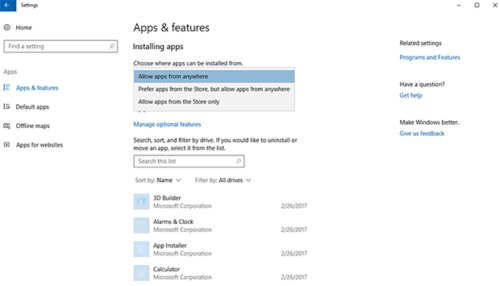
As you might have heard, Microsoft has included a new option in its Windows 10 Creators Update that permits to install only those apps available in the Windows 10 Store. This feature allows to block classic Windows apps from installing on a device and is believed to provide an additional layer of defense against different types of malware.
If you’ve already upgraded to Windows 10 Creators Update, from now on you’re able to control which apps can be installed on your devices by navigating to Settings > Apps & features and choosing between “Allow apps from anywhere”, “Prefer apps from store, but allow from anywhere”, or “Allow apps from the store only”.
So, does it affect Techinline FixMe.IT in any way? [Read more…] about New Windows 10 Feature Allows Block On Win32 Apps, FixMe.IT Not Affected
Best Practices for Secure Remote Access

Whether you need to support multiple computers with no one being present at the remote end or just connect to your office machine while traveling, remote desktop access technology can be a real time saver in either case. However, with so many fears and concerns over security-related remote access problems spread throughout the Internet, you may be wondering if it could do more harm than good to your business or customers. [Read more…] about Best Practices for Secure Remote Access
Windows 10 Creators Update: A Tiny Change That May Affect Some Applications
Good news, everyone: Windows 10 Creators Update has been officially released today, and it’s now available for download on the Microsoft website. The new version adds a handful of new features and improvements to the operating system, including Windows Ink and advanced security settings, and is reported to be the most significant Windows 10 update as of yet.
However, there’s still a fly in the ointment. Windows developers, beware (actually, end users should be aware of this, too). [Read more…] about Windows 10 Creators Update: A Tiny Change That May Affect Some Applications
Resolved: FixMe.IT Server Outage on December 8
What happened?
Yesterday at around 11:30 A.M. EST one of our servers responsible for launching Expert and Client applications temporarily went down. As a result, our users were unable to run FixMe.IT or refresh the unattended client list if already working in the application. However, while the server was down all existing connections were maintained. During the outage our support specialists did their best to provide the necessary assistance and respond to all related customer queries.
Has it been resolved?
Yes. Right after the server became unresponsive, we received an automated alert and began working on the issue immediately. Our team implemented a backup recovery plan within 30 minutes after the outage had started, and everything was returned back to normal around 12 P.M. EST.
We appreciate your patience and understanding, and we thank you for being our valued customers! Please note that you can always count on our support team’s immediate assistance if any issues arise. You may contact us directly or leave us a shout on Twitter, and we’ll do our best to be quick as a flash!