• Skip to primary navigation
  • Skip to main content
  • Skip to primary sidebar
  • Skip to footer

Techinline Blog

Remote Support Software Explained

SetMe
Remote Support Software That Always Works
Free trial
Techinline Blog
  • Product
  • Features
  • Pricing
  • How It Works

Communication & Support

New Windows 10 Feature Allows Block On Win32 Apps, FixMe.IT Not Affected

May 10, 2017 by Dan Kukarsky

New Windows 10 Feature Allows Block On Win32 Apps

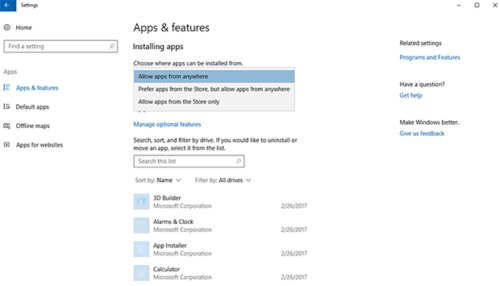
As you might have heard, Microsoft has included a new option in its Windows 10 Creators Update that permits to install only those apps available in the Windows 10 Store. This feature allows to block classic Windows apps from installing on a device and is believed to provide an additional layer of defense against different types of malware.

If you’ve already upgraded to Windows 10 Creators Update, from now on you’re able to control which apps can be installed on your devices by navigating to Settings > Apps & features and choosing between “Allow apps from anywhere”, “Prefer apps from store, but allow from anywhere”, or “Allow apps from the store only”.

So, does it affect Techinline FixMe.IT in any way? [Read more…] about New Windows 10 Feature Allows Block On Win32 Apps, FixMe.IT Not Affected

Filed Under: Communication & Support Tagged With: Windows 10, Windows Creators Update

Unknown FixMe.IT Setup Errors – What to Do?

November 16, 2016 by Dan Kukarsky

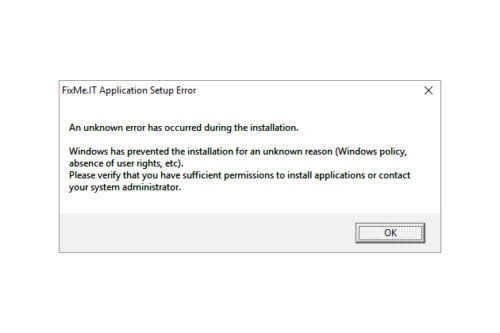
Identify compatibility issues and eliminate unknown FixMe.IT setup errors

Based on recent customer feedback, FixMe.IT has proven to be one of the most stable and reliable remote desktop tools on the market providing IT pros with secure means of connecting to remote computers from anywhere in the world. However, like with any other software, you might stumble upon some unexpected errors when trying to run FixMe.IT on your machine. Now let’s take a look at what may cause these errors and what can be done to eliminate them. [Read more…] about Unknown FixMe.IT Setup Errors – What to Do?

Filed Under: Communication & Support, Product Tagged With: Compatibility, Techinline

FixMe.IT & “This App Can’t Open” Issue in Windows 10 Safe Mode

November 1, 2016 by Dan Kukarsky

FixMe.IT & This App Can’t Open Issue in Windows 10 Safe Mode

We have recently received a couple of reports from our users who’ve run into “This app can’t open” error after booting a remote machine into safe mode on Windows 10. Let’s see what this issue is all about, and whether it actually concerns the FixMe.IT application or its performance in any way. [Read more…] about FixMe.IT & “This App Can’t Open” Issue in Windows 10 Safe Mode

Filed Under: Communication & Support Tagged With: Safe Mode, Windows 10

How to Restore FixMe.IT Remote Session after Safe Mode Reboot on Windows 10

October 27, 2016 by Dan Kukarsky

How to restore remote session after safe mode reboot on Windows 10

You reboot your remote client’s Windows 10 machine into Safe Mode, and that’s where the big disappointment comes – you realize that for some strange reason the Wi-Fi connection is disabled. Most of the services you need are off and you’re having a hard time restoring Internet access. Does the symptom sound familiar? If so, chances are that you’ll find this quick guide useful. [Read more…] about How to Restore FixMe.IT Remote Session after Safe Mode Reboot on Windows 10

Filed Under: Communication & Support, Tips & Tricks Tagged With: Safe Mode, Wi-Fi, Windows 10

FixMe.IT Customer Care: On Guard of Your Product Experience

September 8, 2016 by Dan Kukarsky

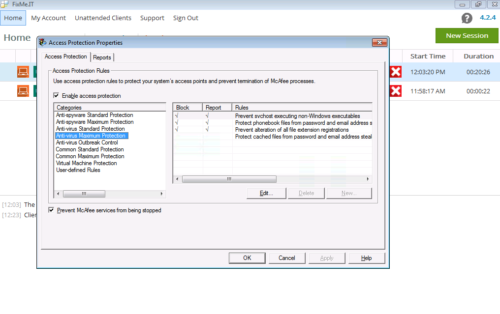
Configuring McAfee to work with FixMe.IT remote desktop app

Whether you’re doing a free trial of FixMe.IT or already using our product to provide remote tech support services, you can always count on our team’s professional guidance and immediate assistance. In a previous article we described the way to fine tune Trend Micro OfficeScan for a better FixMe.IT experience. This time, as part of our regular blog category, we’ll share a few other notable customer support cases along with tips that some of you might find useful. [Read more…] about FixMe.IT Customer Care: On Guard of Your Product Experience

Filed Under: Communication & Support Tagged With: Anti-Virus, McAfee, Tech support, Techinline

Fixed “Jumping Mouse” Issue on Windows 7 & Vista

April 28, 2016 by Dan Kukarsky

Fixed “Jumping Mouse” Issue on Windows 7 & Vista

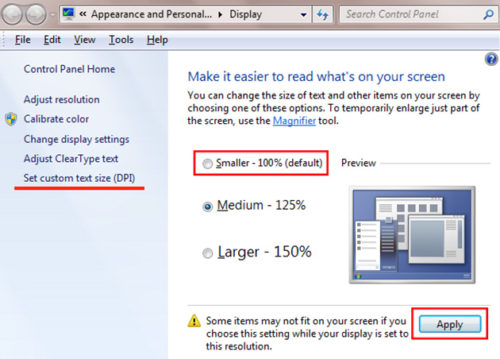
We’ve recently received a report from one of our users regarding a “jumping cursor” issue that occurred on Windows 7/Vista. The user’s mouse cursor appeared jumping all over the screen when moving it over certain windows during the support session. We’ve conducted an in-depth investigation and found that this issue was attributed to the use of legacy Windows applications that were DPI-unaware, and thus created the disturbance.

Here’s a quick workaround that helped us get the issue resolved:  [Read more…] about Fixed “Jumping Mouse” Issue on Windows 7 & Vista

Filed Under: Communication & Support

  • « Go to Previous Page
  • Page 1
  • Page 2
  • Page 3
  • Go to Next Page »

Primary Sidebar

Most Popular

Meet SetMe Solo: Ideal Pricing Plan for Individual & Small Businesses

New SetMe Features: In-Session Unattended Setup, Screen Blanking for Mac & More

SetMe's Unattended Access Is Here

New SetMe Feature: Disable Remote Input

Chrome Remote Desktop Review: The Pros & Cons

Best Remote Desktop Software for Mac in 2024

Follow Us

Recent Posts

  • Multi-Factor Authentication (MFA) in Remote Access Software October 16, 2025
  • How to Disable Automatic Updates on Windows 11 (Step-by-Step 2025 Guide) September 26, 2025
  • 5 Things to Know About Remote Desktop Software in 2025 September 17, 2025
  • Unattended Access: Use Cases & Benefits September 15, 2025
  • How to Remove Built-In Windows 11 Apps September 2, 2025
  • Fix Unmountable Boot Volume Error in Windows 10 & 11 (2025 Guide) August 26, 2025

Footer

Product

  • Features
  • Pricing
  • How It Works
  • Security

Resources

  • Product Roadmap
  • Help Center

Try It Free

Do you enjoy reading our posts? You might also like our remote support app. Give it a try, it's free for 15 days:

Try SetMe Free

© 2026 · Techinline Ltd. · Built on the Genesis Framework