
The FixMe.IT development team is always working hard in an effort to improve your experience with the application and help you deliver the highest level of service to your customers, and today we’re happy to introduce a new FixMe.IT version 4.3!
The latest software update includes several enhancements of the unattended access feature, a minor, yet handy addition to the built-in text chat, along with a few other bug fixes. Now let’s take a look at what’s new.
Enhanced unattended access
First and foremost, from now on you’ll be enjoying faster remote access, as we’ve reduced the average time for connecting to an unattended machine. Second, we have fixed the issue that caused delays in updating the current status of an unattended computer during Shutdown, Log Off/Log On, or Switch User operations. Apart from that, our dev team has fixed the issue that sometimes prevented mass deployment of the unattended client.
By the way, you might want to read this post if you’d like to learn how to install the FixMe.IT unattended client on multiple remote machines using the psexec utility.
Improved usability
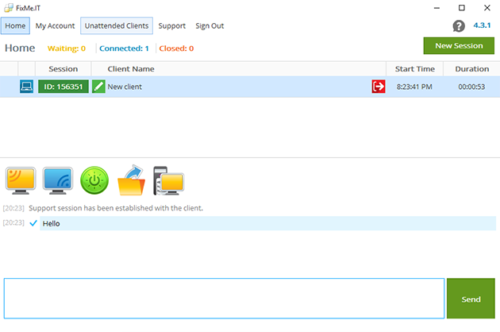
We have added delivery statuses to our built-in text chat, which means that from now on you’ll be able to see if your message has been sent or received by the remote user. Furthermore, we’ve fixed the issue that caused delays in the Reboot => Request Windows Password operation on Windows 10, and we’ve also expanded the default size of the Client Application window.
Fixed remote control issues
We have fixed an issue that occurred when trying to view or control multiple monitors connected to different video adapters on a remote machine. Now the application can easily mirror all of the remote screens regardless of the number of video cards you’ve got installed in your machine. Besides that, we’ve readjusted FixMe.IT to work with DPI-aware applications on Windows 8 and later – earlier on you might have experienced incorrect mouse pointer positioning. Last but not least, the issue that prevented switching keyboard language using the Alt+Shift combination is also fixed now.
Whether you experience any problems, or get persistent error notifications when upgrading to the newest version of our application, please follow this guide, or refer to the Knowledge Base on our website.
We’re truly excited to roll out the new version of our remote desktop application, and we do hope that you’ll enjoy it, too! If you experience any issues with completing the upgrade, please do not hesitate to contact our support team directly for timely assistance.
Find us on Facebook, Twitter, YouTube, Google+ or LinkedIn to get the latest news, updates, tips, etc.