
We’re thrilled to introduce the FixMe.IT 4.5 version update, which includes the long-awaited Multi-Window Control feature along with several other useful improvements and fixes. Now let’s take a closer look at what’s new and how you can take advantage of these enhancements.
The Multi-Window Control feature will allow you to multitask more effectively and will provide you with more flexibility when working with several remote client machines that have different screen and network settings. This new functionality enables you to view and control all of the connected remote desktops simultaneously, as well as specify individual settings for each remote desktop window.
With the Multi-Window Control feature, you’re now able to open up multiple remote desktop windows on your screen, easily switch between them and drag-and-drop files from/to a remote desktop or even between the client machines.
Furthermore, the new functionality coupled with the improved scaling features introduced in FixMe.IT 4.4 allows you to adjust the Scaling and Image Quality settings for each remote desktop window independently.
Here’s a real-life scenario of how Multi-Window Control can help improve your remote support experience:
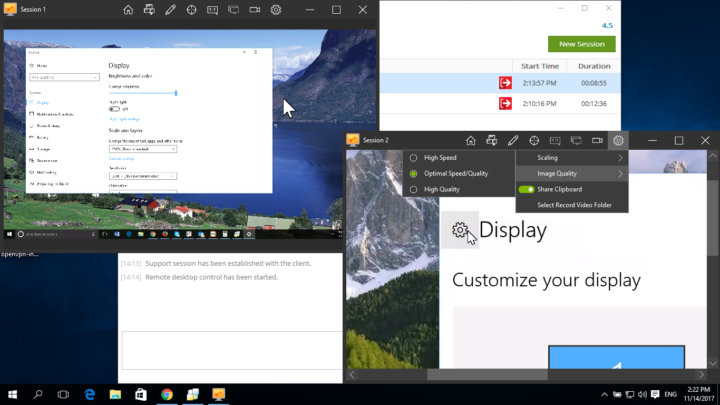
In this example, the first remote desktop control window (Session 1) is scaled to window and the image quality is set to High, as the remote client has a larger screen resolution than the expert. In the meantime, Session 2 is also scaled to fit the remote desktop in window mode.
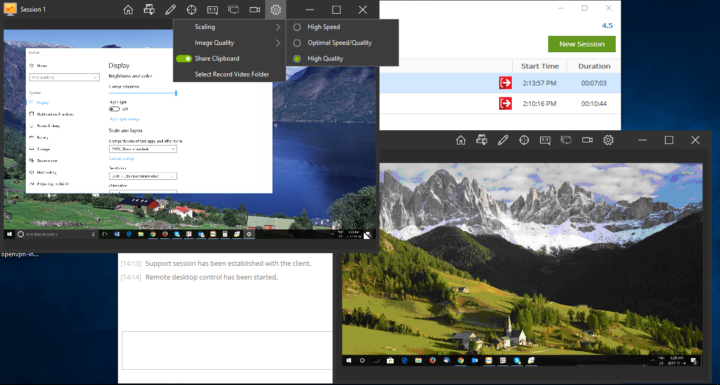
Here’s the example of what happens if the second window (Session 2) is set to display the Original Size of the remote desktop with the optimal speed/quality ratio. Although the remote desktop appears to be “zoomed in”, here you may use the scrollbars located at the bottom and left side of the window to conveniently navigate the remote screen.
In the coming days we’ll share more real-life examples of how you can benefit from the Multi-Window Control feature.
We’re truly happy to roll out this new, highly anticipated feature, and we hope that you’ll like it, too! Got any questions or feedback? Don’t hesitate to contact our support team directly for timely assistance.
Subscribe to our blog and join us on Facebook, Twitter, YouTube and LinkedIn to get all the latest news and product updates as they happen.