
• Skip to primary navigation
  • Skip to main content
  • Skip to primary sidebar
  • Skip to footer

Techinline Blog

Remote Support Software Explained

SetMe
Remote Support Software That Always Works
Free trial
Techinline Blog
  • Product
  • Features
  • Pricing
  • How It Works

Windows 10 Restarts after Shutdown: How to Fix It

September 18, 2018 by Dan Kukarsky

Windows 10 may unexpectedly restart after you select the Shutdown option or put the system into Sleep or Hibernate mode. Here’s how to fix this issue.

Turn off Fast Startup feature

According to numerous reports, turning off the Fast Startup feature helps fix the issue in most cases.

  1. Go to Windows Settings > System > Power & Sleep > Additional power settings.
  2. Click Choose what the power button does, then click Change settings that are currently unavailable.
  3. Disable the Turn on fast startup feature.
  4. Save changes and shut down the PC to see if the issue has been fixed.


Need an easy way to fix Windows issues like this remotely? FixMe.IT is the world’s #1 rated remote support app that allows to connect to any remote PC in 3 easy steps. Click here to see how it works.

Disable Fast Startup via Registry Editor

  1. Press Win+R, type in regedit and hit Enter to open the Registry Editor.
  2. Go to HKEY_LOCAL_MACHINE > SYSTEM > CurrentControlSet > Control > SessionManager > Power.
  3. Set the value of HiberbootEnabled to 0.
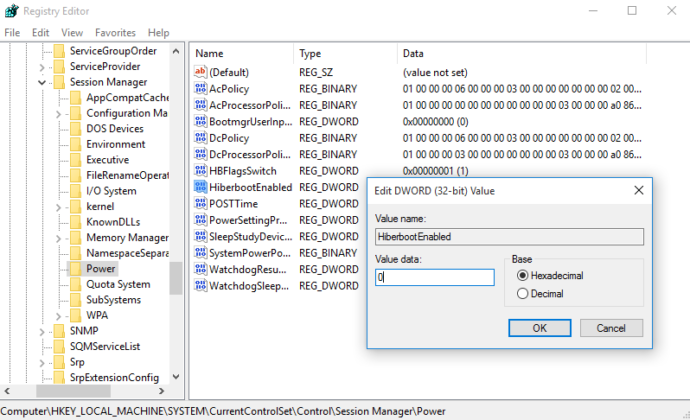
Windows 10 restarts after shutdown: how to fix it

Check for driver or program issues in Clean Boot State mode

Specific programs or corrupt drivers may lead to an unexpected reboot after shutdown. Boot the system into Clean Boot State and try to locate the program or driver that’s causing the problem by disabling one application after another.

If neither of the options work, run the Power Efficiency Diagnostics Report to see if there are any other energy or battery life issues with the PC.

Did you find this article helpful? See more Windows tips & tricks on our blog and join us on Facebook, Twitter, or LinkedIn to get all the latest updates as they happen.

Learn More About FixMe.IT

Related Posts

  • VPN Stuck on "Connecting" in Windows 10: How to Fix It
  • Fix Unmountable Boot Volume Error in Windows 10 & 11 (2025 Guide)
  • How to Disable Cortana on Windows 10

Filed Under: Windows Tips & Tricks Tagged With: Windows 10

Primary Sidebar

Most Popular

Meet SetMe Solo: Ideal Pricing Plan for Individual & Small Businesses

New SetMe Features: In-Session Unattended Setup, Screen Blanking for Mac & More

SetMe's Unattended Access Is Here

New SetMe Feature: Disable Remote Input

Chrome Remote Desktop Review: The Pros & Cons

Best Remote Desktop Software for Mac in 2024

Follow Us

Recent Posts

  • Multi-Factor Authentication (MFA) in Remote Access Software October 16, 2025
  • How to Disable Automatic Updates on Windows 11 (Step-by-Step 2025 Guide) September 26, 2025
  • 5 Things to Know About Remote Desktop Software in 2025 September 17, 2025
  • Unattended Access: Use Cases & Benefits September 15, 2025
  • How to Remove Built-In Windows 11 Apps September 2, 2025
  • Fix Unmountable Boot Volume Error in Windows 10 & 11 (2025 Guide) August 26, 2025

Footer

Product

  • Features
  • Pricing
  • How It Works
  • Security

Resources

  • Product Roadmap
  • Help Center

Try It Free

Do you enjoy reading our posts? You might also like our remote support app. Give it a try, it's free for 15 days:

Try SetMe Free

© 2025 · Techinline Ltd. · Built on the Genesis Framework