
• Skip to primary navigation
  • Skip to main content
  • Skip to primary sidebar
  • Skip to footer

Techinline Blog

Remote Support Software Explained

SetMe
Remote Support Software That Always Works
Free trial
Techinline Blog
  • Product
  • Features
  • Pricing
  • How It Works

How to Fix Double Login Issue on Windows 10 Fall Creators Update

October 18, 2017 by Dan Kukarsky

Some users have recently reported that they have to login twice after restarting or shutting down a machine running on Windows 10 Fall Creators Update. After entering the Windows password, they subsequently get redirected back to the Windows 10 Welcome screen prompting to enter the credentials again.

This turns out to be a new Microsoft bug which occurs on Windows 10 Creators Update specifically after restarting or shutting down a machine. Please keep in mind that you or your clients may experience this issue following the update.

Here’s a quick fix that will help you avoid the double login request described above:

  1. Click the Start button, then select Settings > Accounts > Sign-in options.
  2. In the Privacy section, turn off Use my sign in info to automatically finish setting up my device after an update or restart.
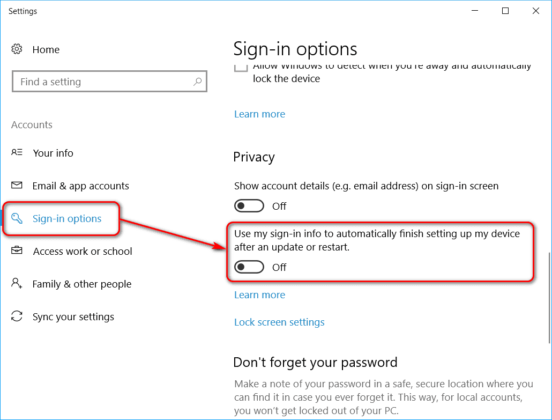
Fix Double Login Issue On Windows 10 Fall Creators Update

You can easily connect using FixMe.IT to make the necessary adjustments on a remote client’s machine.

Our team has conducted in-depth testing to ensure that FixMe.IT is fully compatible with the Windows 10 Fall Creators Update, so rest assured that everything works exactly as it should. Join us on Facebook, Twitter, or LinkedIn to get all the latest tips, news and product updates as they happen.

Learn More About FixMe.IT

Related Posts

  • How to Avoid Windows 10 Login Screen Loop After Fall Creators Update
  • Windows 10 Creators Update: A Tiny Change That May Affect Some Applications
  • Hotfix for Windows XP Memory Leak Issue

Filed Under: Windows Tips & Tricks Tagged With: Windows 10, Windows Creators Update

Primary Sidebar

Most Popular

Meet SetMe Solo: Ideal Pricing Plan for Individual & Small Businesses

New SetMe Features: In-Session Unattended Setup, Screen Blanking for Mac & More

SetMe's Unattended Access Is Here

New SetMe Feature: Disable Remote Input

Chrome Remote Desktop Review: The Pros & Cons

Best Remote Desktop Software for Mac in 2024

Follow Us

Recent Posts

  • Multi-Factor Authentication (MFA) in Remote Access Software October 16, 2025
  • How to Disable Automatic Updates on Windows 11 (Step-by-Step 2025 Guide) September 26, 2025
  • 5 Things to Know About Remote Desktop Software in 2025 September 17, 2025
  • Unattended Access: Use Cases & Benefits September 15, 2025
  • How to Remove Built-In Windows 11 Apps September 2, 2025
  • Fix Unmountable Boot Volume Error in Windows 10 & 11 (2025 Guide) August 26, 2025

Footer

Product

  • Features
  • Pricing
  • How It Works
  • Security

Resources

  • Product Roadmap
  • Help Center

Try It Free

Do you enjoy reading our posts? You might also like our remote support app. Give it a try, it's free for 15 days:

Try SetMe Free

© 2026 · Techinline Ltd. · Built on the Genesis Framework